> For the complete documentation index, see [llms.txt](https://docs.tiun.io/llms.txt). Markdown versions of documentation pages are available by appending `.md` to page URLs; this page is available as [Markdown](https://docs.tiun.io/reference/checkout/subscriptions.md).
# Subscriptions
A subscription in tiun ties an **identified user** to a **product** on a recurring schedule. This page covers the lifecycle from anonymous visitor to paying customer to expiration — and what your app should expect at each step.
***
## The journey
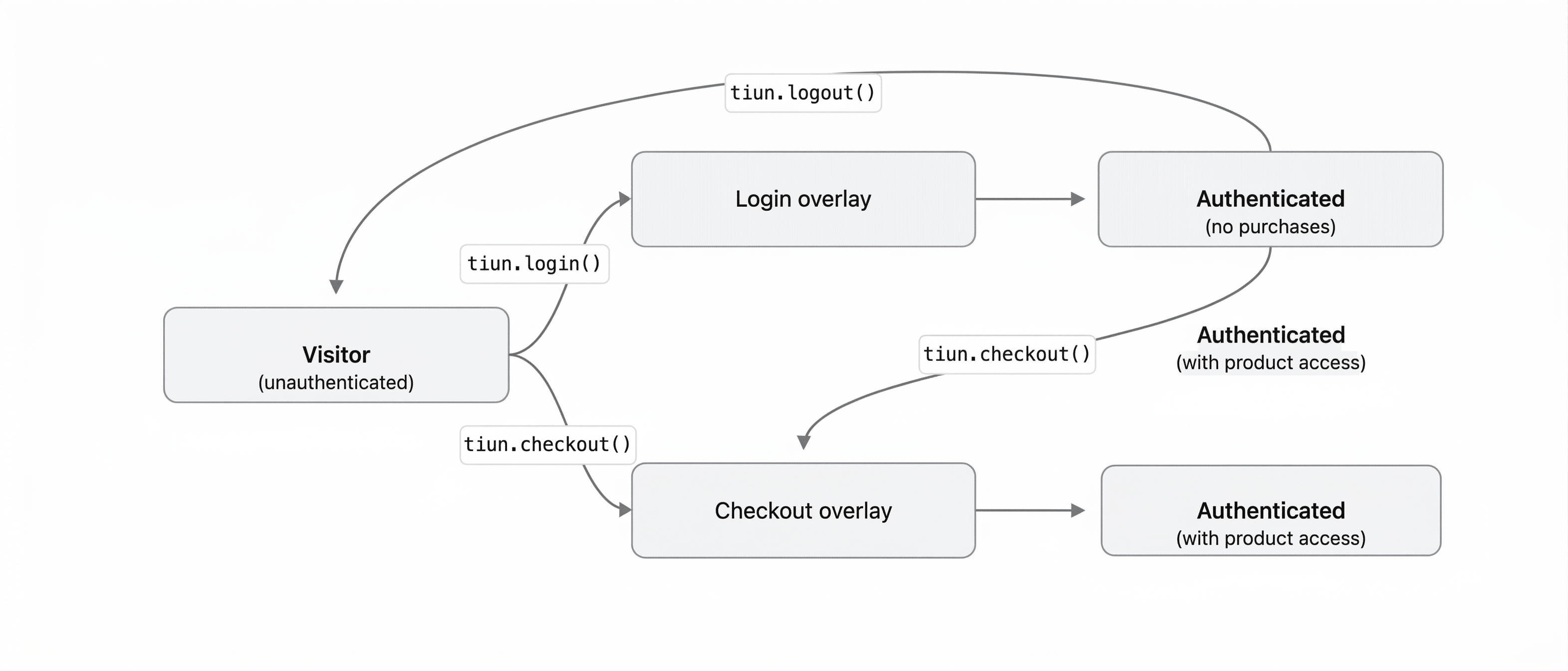
1. A **visitor** arrives unauthenticated — no tiun session yet.
2. They open **checkout** directly. The overlay collects email and payment; completing it **authenticates the user** and **grants access** to the product in one step.
3. Alternatively they may **log in first** with `tiun.login()`, then subscribe later via checkout when ready.
4. A **returning user** on the same browser gets **session restoration** automatically; `userChange` fires with `event: 'init'` so your UI can sync.
5. The user may **log out**; the session is cleared and they're anonymous again until they sign in or check out again.
{% hint style="info" %}
Checkout authenticates the user automatically. If a visitor goes directly to checkout without logging in first, they provide their email during the payment flow and are authenticated as part of completing it.
{% endhint %}
***
## Flow diagram
The top branch shows **login first**, then optional checkout or logout. The bottom branch shows **checkout from cold start**, which both subscribes and establishes identity.
***
## Renewal and expiration
Subscription renewal is **automatic**. tiun handles the billing cycle, payment retries, and keeps subscription state consistent with what the customer has paid for — you don't run cron jobs or webhook listeners for renewals.
While a subscription is active, the corresponding product ID appears in the user's `productAccess`. When access ends — after a successful cancellation or a permanent payment failure — tiun removes the product ID and emits `userChange` so your UI immediately reflects the new state. See [Product access](/reference/checkout/product-access.md) for how that array is the source of truth and how to check it in code.
You do not need to implement any manual renewal management for the standard subscription lifecycle.
***
## Where to go next
* [Checkout / How it works](/reference/checkout/how-it-works.md) — what the overlay does and how identity is verified.
* [Product access](/reference/checkout/product-access.md) — how `productAccess` is populated and how to gate features.
* [One-time purchases](/reference/checkout/one-time-purchases.md) — the same checkout flow for products bought once instead of on a schedule.
* [Authentication / How it works](/reference/authentication/how-it-works.md) — the broader login and session model.
* For an end-to-end walkthrough, see [monetizing with subscriptions](/guides/subscriptions/monetize-with-subscriptions.md).
---
# Agent Instructions
This documentation is published with GitBook. GitBook is the documentation platform designed so that both humans and AI agents can read, navigate, and reason over technical content effectively. Learn more at gitbook.com.
## Querying This Documentation
If you need additional information that is not directly available in this page, you can query the documentation dynamically by asking a question.
Perform an HTTP GET request on the current page URL with the `ask` query parameter, and the optional `goal` query parameter:
```
GET https://docs.tiun.io/reference/checkout/subscriptions.md?ask=&goal=
```
`ask` is the immediate question: it should be specific, self-contained, and written in natural language.
`goal` is optional and describes the broader end goal you are ultimately trying to accomplish on behalf of the user. GitBook uses it to tailor the answer towards what is most useful for that goal.
The response will contain a direct answer to the question and relevant excerpts and sources from the documentation.
Use this mechanism when the answer is not explicitly present in the current page, you need clarification or additional context, or you want to retrieve related documentation sections.