> For the complete documentation index, see [llms.txt](https://docs.tiun.io/llms.txt). Markdown versions of documentation pages are available by appending `.md` to page URLs; this page is available as [Markdown](https://docs.tiun.io/reference/checkout/how-it-works.md).
# How it works
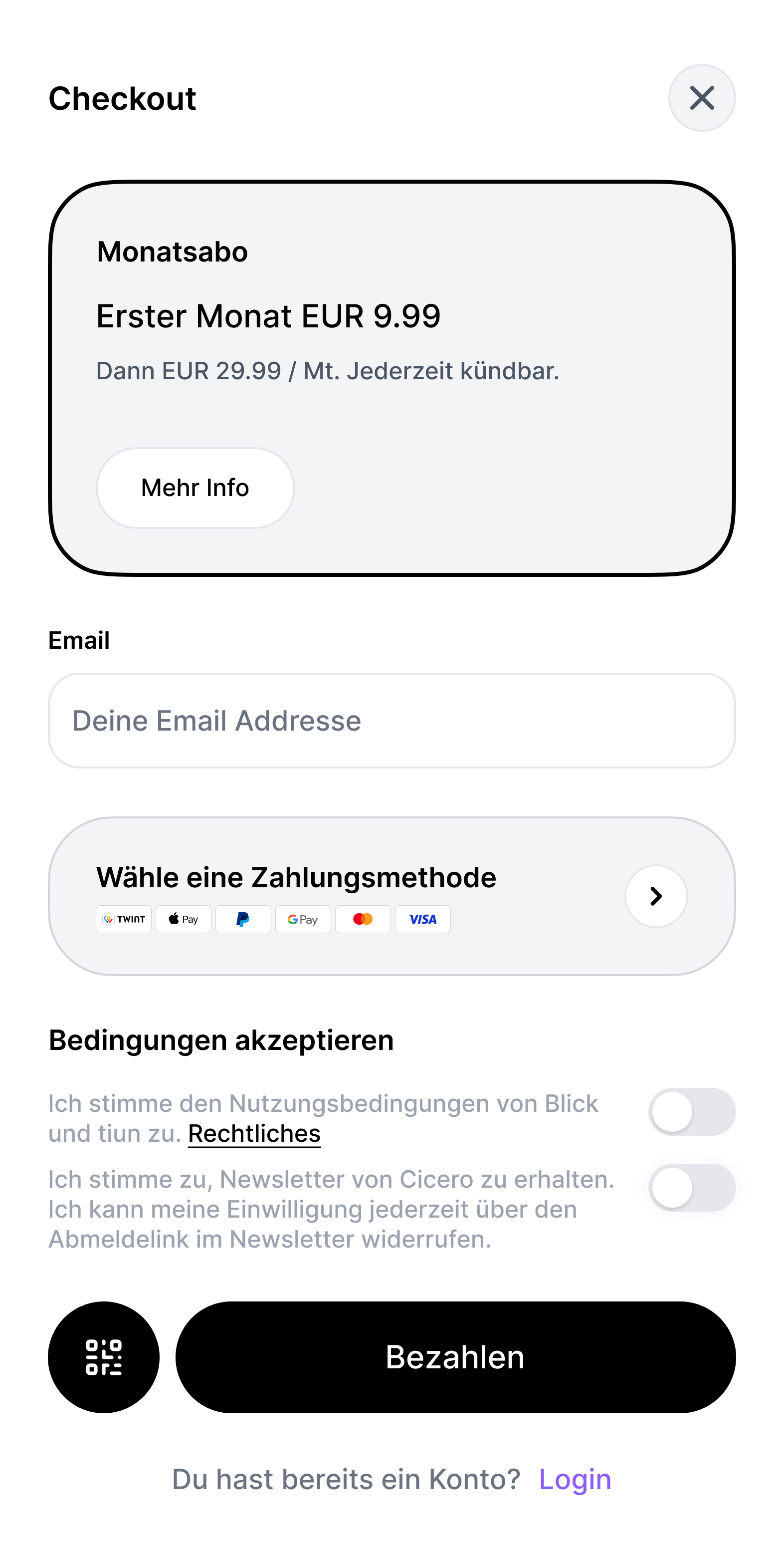
Call `tiun.checkout({ productId })` and tiun opens a **full-screen overlay** that runs the entire purchase and sign-in experience. You don't build forms, validate inputs, or host payment fields yourself.
***
## What the overlay contains
For a subscription or one-time product, the overlay walks the user through:
* **Plan details** — product name and pricing. A subscription also shows the billing interval and any trial info; a one-time product shows the price and neither.
* **Email entry** — the user is identified by email as part of checkout.
* **Payment method selection** — credit/debit cards (Visa, Mastercard, American Express), PayPal, Apple Pay, Google Pay, and TWINT, where enabled and regionally available.
* **Terms acceptance** and a clear pay action.
A **Login** affordance also appears at the bottom of the overlay so a visitor who already has a tiun account can sign in instead of entering email as a new customer.
***
## Identity verification
* If the email is **recognized** (returning user), tiun sends an OTP code to the **phone number** already linked to the account.
* If the email is **not recognized**, an additional overlay asks for the user's phone number, then sends an OTP to validate and link it before payment continues.
Checkout authenticates as part of the same flow — there's no separate sign-up step. See [Authentication / How it works](/reference/authentication/how-it-works.md) for the broader identity model.
***
## Managed by tiun
The overlay is owned and updated by tiun: layout, validation, compliance copy, and payment UI stay consistent without changes in your codebase. The flow also surfaces in-overlay help — including an explainer video link and "More info" affordances where appropriate — so common questions are handled inside checkout.
For what happens after the user completes checkout (the journey, session restore, logout), see [Subscriptions](/reference/checkout/subscriptions.md) or [One-time purchases](/reference/checkout/one-time-purchases.md). For the resulting entitlements on the user, see [Product access](/reference/checkout/product-access.md).
---
# Agent Instructions
This documentation is published with GitBook. GitBook is the documentation platform designed so that both humans and AI agents can read, navigate, and reason over technical content effectively. Learn more at gitbook.com.
## Querying This Documentation
If you need additional information that is not directly available in this page, you can query the documentation dynamically by asking a question.
Perform an HTTP GET request on the current page URL with the `ask` query parameter, and the optional `goal` query parameter:
```
GET https://docs.tiun.io/reference/checkout/how-it-works.md?ask=&goal=
```
`ask` is the immediate question: it should be specific, self-contained, and written in natural language.
`goal` is optional and describes the broader end goal you are ultimately trying to accomplish on behalf of the user. GitBook uses it to tailor the answer towards what is most useful for that goal.
The response will contain a direct answer to the question and relevant excerpts and sources from the documentation.
Use this mechanism when the answer is not explicitly present in the current page, you need clarification or additional context, or you want to retrieve related documentation sections.